CoreCredit app icon

CoreCredit

Know exactly how much core-credit money is still at risk.

A local-first ledger for refundable parts-core charges, built for owner-operated one-to-five-bay auto, diesel, collision, and equipment-repair shops. Every core is tracked from the moment it lands on an invoice until the vendor credit actually shows up.

Coming soon for iPhone Designed for iPhone, adapts to iPad
Money at risk What each status means for the money
  • Awaiting old core At risk The core charge is on the invoice. The old unit is not in hand yet.
  • Ready to return At risk The old unit is boxed and identified, waiting to go back.
  • Returned — awaiting credit At risk It went back to the vendor. The money has not come back yet.
  • Disputed At risk The credit was short or never appeared, and is still being chased.
  • Credited Settled The vendor credit actually arrived and was recorded.
  • Written off Settled Deliberately abandoned, on the record, as a decision rather than a gap.

The problem

A core charge is your money sitting on someone else's shelf.

Every remanufactured starter, alternator, caliper, injector, turbo, and battery arrives with a refundable charge attached. The shop pays it up front and gets it back only by returning the old unit to the right vendor, in time, and then actually receiving the credit.

Returning a core does not mean the money has been credited.

That gap is where core money quietly disappears. A returned-but-uncredited core is still the shop's money at risk. It stays at risk until the credit is recorded against it, the shortfall is disputed, or someone deliberately writes it off. A box that left the building is not a settled account.

Most one-to-five-bay shops track this on a whiteboard, a clipboard, or nothing at all, because the core module in a full shop-management suite costs more than the problem appears to. CoreCredit does that one narrow job and nothing else.

  • A core that went back last month and was never credited looks exactly like one that was.
  • A credit that comes back short is easy to miss on a statement and hard to prove later.
  • A return window closes quietly, and nobody finds out until the vendor says no.
  • The old unit is in the building somewhere, in a box, and nobody is sure which one.

How it works

Six steps, from the invoice to the credit.

CoreCredit follows the way a core actually moves through a shop. Nothing is settled until the money comes back.

  1. Log the core charge

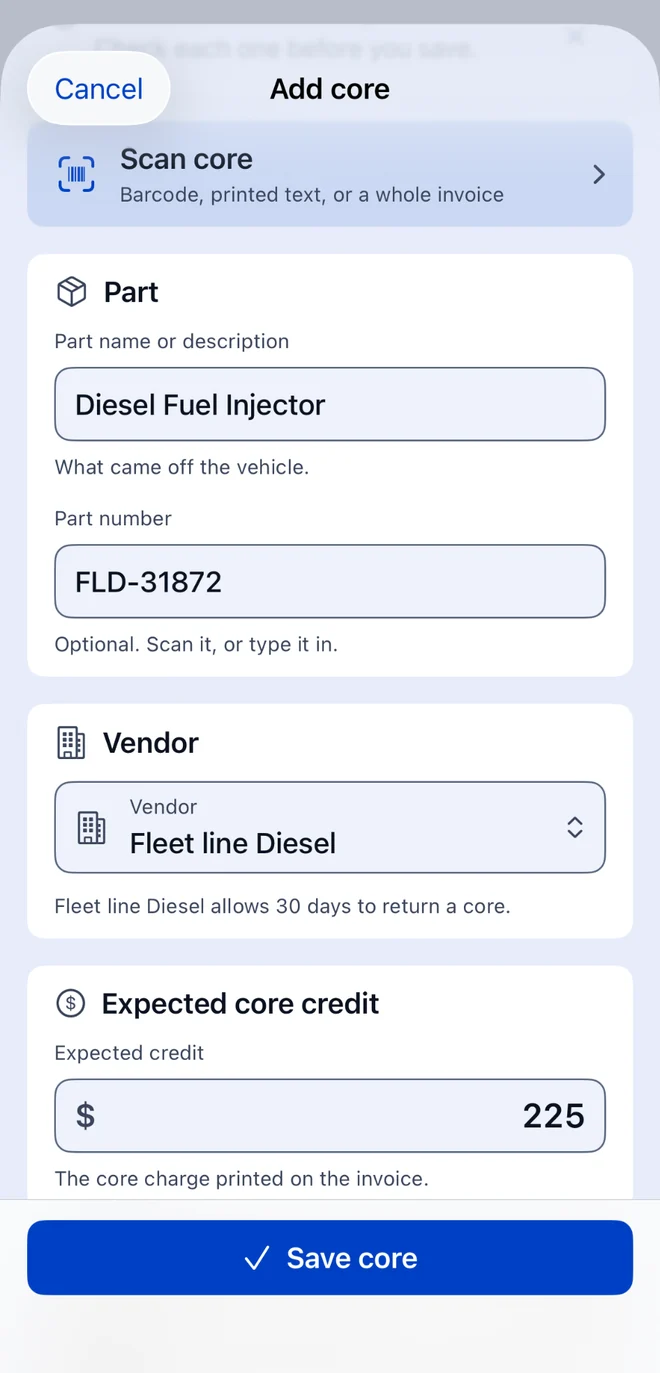
    A replacement part arrives with a refundable core charge. Record the amount, the part, the vendor, and the invoice or repair-order reference — typed, or read from the paperwork with the camera.

  2. Keep the old unit findable

    Assign the old part to a storage bin so it can be found in the building, usually back in the box the new one came in.

  3. Watch the return window

    Each vendor carries its own return window. Due dates are calculated from it, and local reminders fire before the deadline closes.

  4. Return it in a batch

    Group everything going back to one vendor into a single return batch, and keep the return reference or receipt with it.

  5. Wait for the credit — visibly

    The core moves to Returned — awaiting credit and stays counted in money at risk. Returning it does not settle it.

  6. Reconcile, dispute, or write off

    Record the credit that actually arrived. A full credit settles the core. A short one moves it to Disputed with the shortfall shown and a dispute packet ready to export.

What is in it

Focused on the money, not on running your shop.

CoreCredit is not a repair-order system, an inventory manager, or an accounting product. It tracks core charges and vendor credits, and it does that thoroughly.

  • Total money at risk

    One figure for everything still outstanding, across every unresolved core. A partially credited disputed item counts only for what is still short.

  • Core items and their history

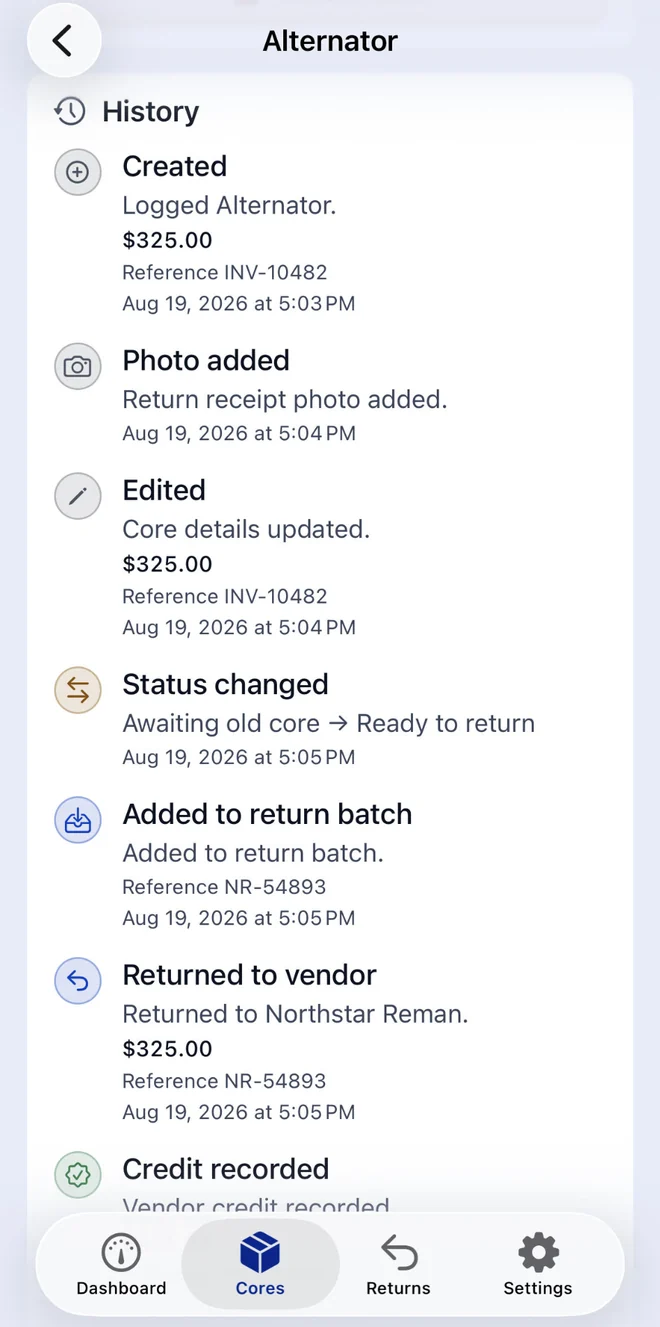
    Amounts, part details, invoice and repair-order references, dates, status, and notes, with an append-only event timeline behind each record.

  • Vendors and storage bins

    Each vendor carries its own return window. Each bin tells you where the old unit is actually sitting.

  • Barcode and offline OCR entry

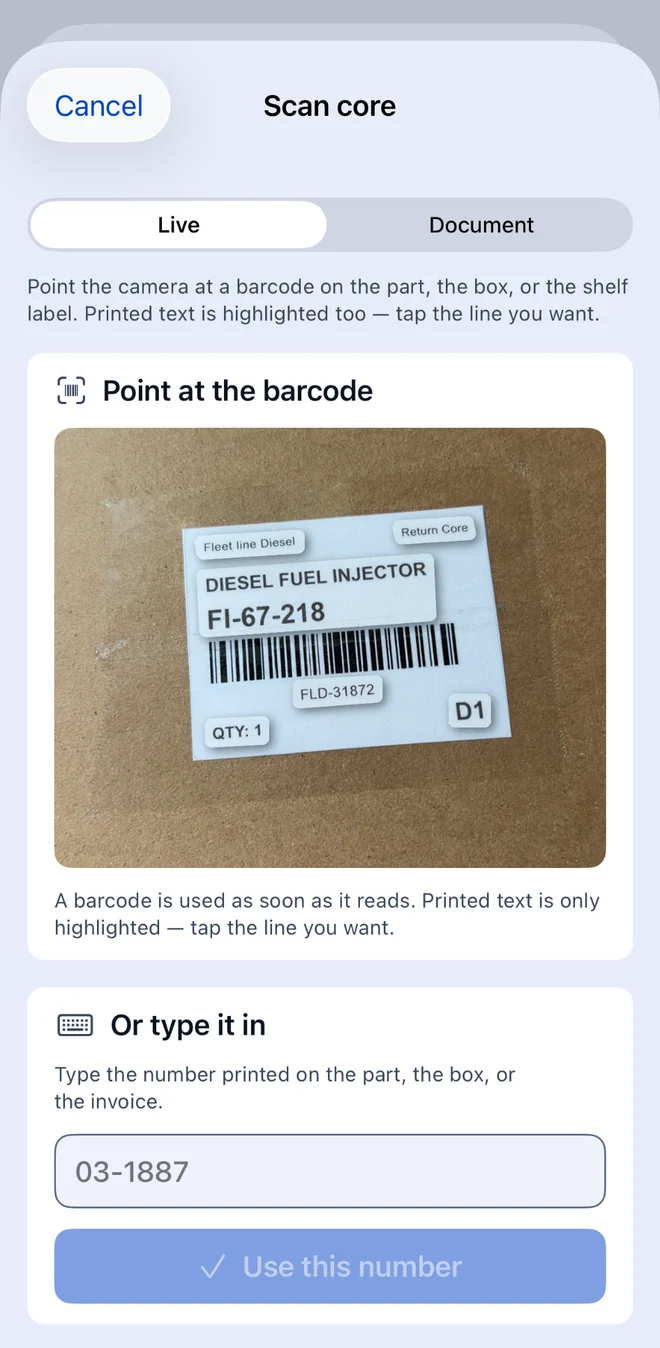
    Read barcodes and printed text from an invoice with the camera. Recognition runs entirely on the device — nothing is uploaded for processing.

  • You confirm before anything is saved

    Scanned information always lands on a review screen first. No amount, reference, or date is written to a record until a person checks it.

  • Return batches by vendor

    Group everything going back to one supplier into a single batch, with its own return reference, so a whole run can be reconciled together.

  • Returned-but-awaiting-credit tracking

    The status that matters most has its own place in the ledger, and stays counted in money at risk until a real credit is recorded.

  • Full and short credit reconciliation

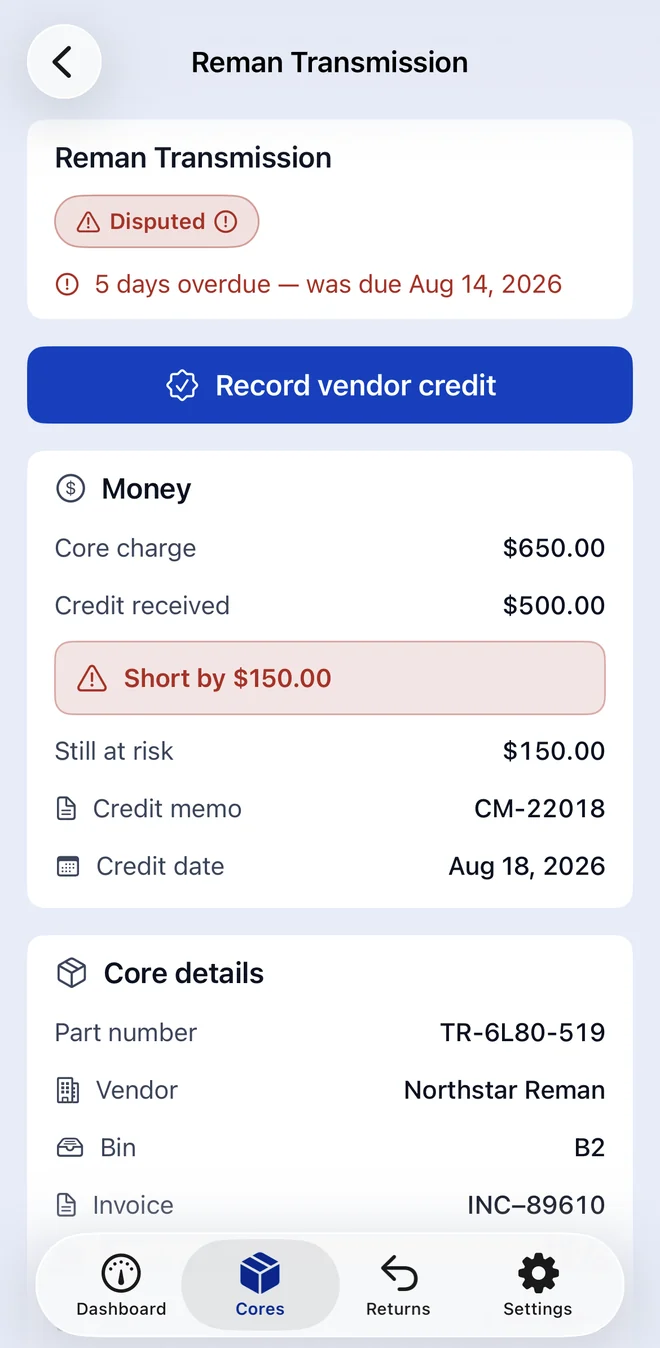
    Record the credit you actually received. CoreCredit works out whether it settles the core or leaves a shortfall, and shows the difference.

  • Disputes with evidence

    Attach photos of the part, the box, the invoice, and the receipt, and keep them with the core they belong to.

  • Exportable dispute packets

    Produce a single document for a short or missing credit, so the conversation with the vendor starts from the record instead of from memory.

  • Local deadline reminders

    Notifications are scheduled and delivered by the device itself. There is no push server and no message to anyone else.

  • CSV and JSON exports

    Take the ledger out as a spreadsheet or a portable backup file whenever you want, through the standard share sheet.

  • Works offline. The parts room is not where signal goes to thrive.
  • No account, no sign-in. Open the app and start recording.
  • iPhone-first, with a layout that adapts on iPad.
  • Built for the counter, not for a desk — one-handed, in a hurry, with gloves on.

A look at the app

Built to be read across a parts counter.

Plain figures, plain status names, and a layout that survives a workshop rather than a showroom. Here is what you will be working with.

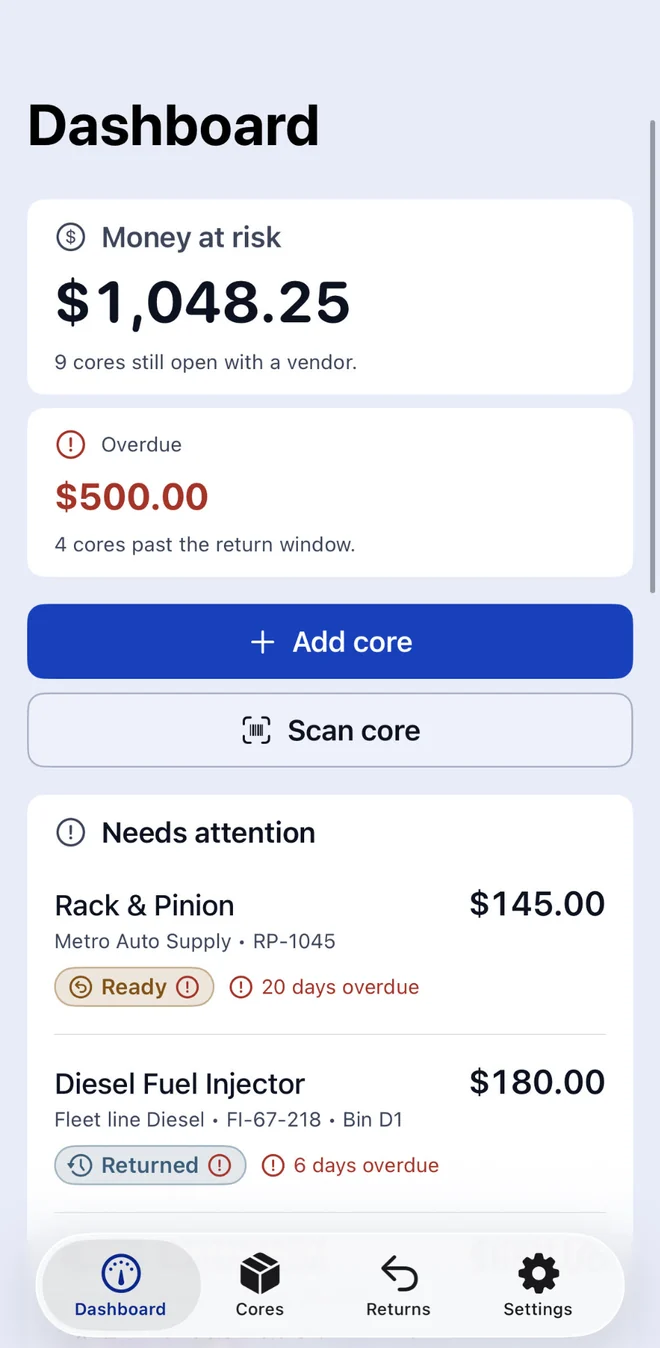
  1. Dashboard

    Total money at risk across every unresolved core, with what is overdue, what is due soon, and what has gone back but has not been credited.

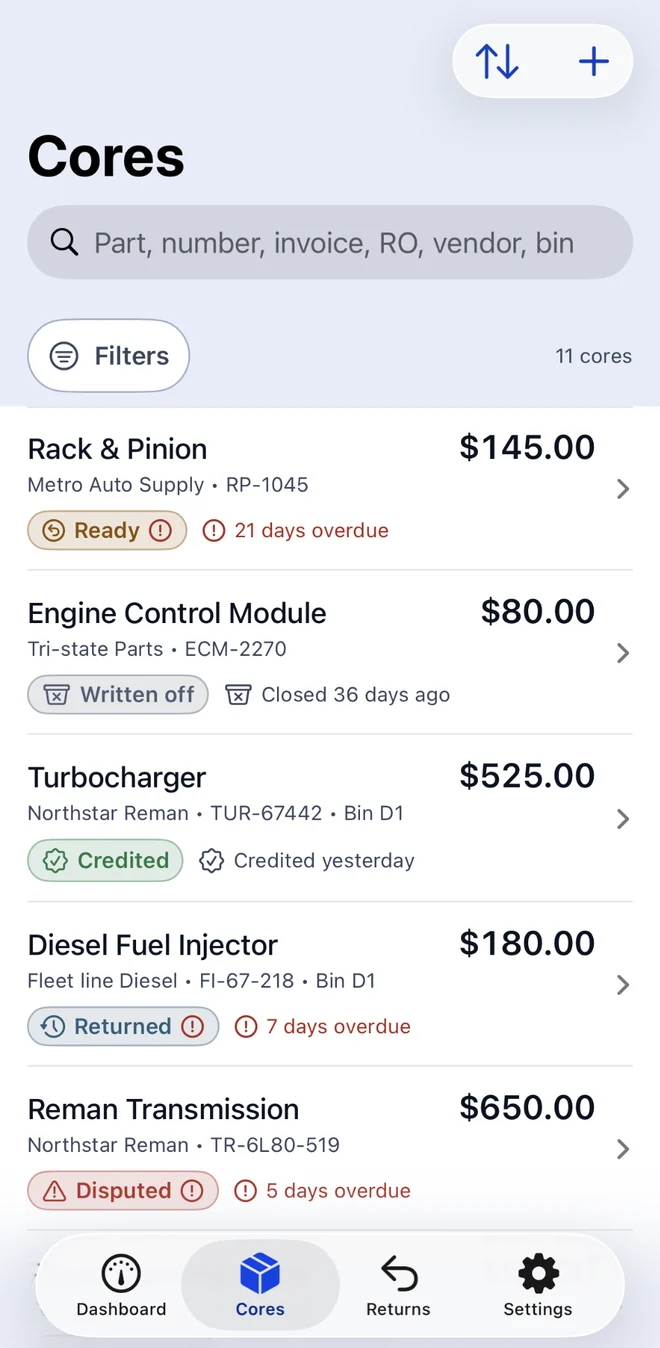
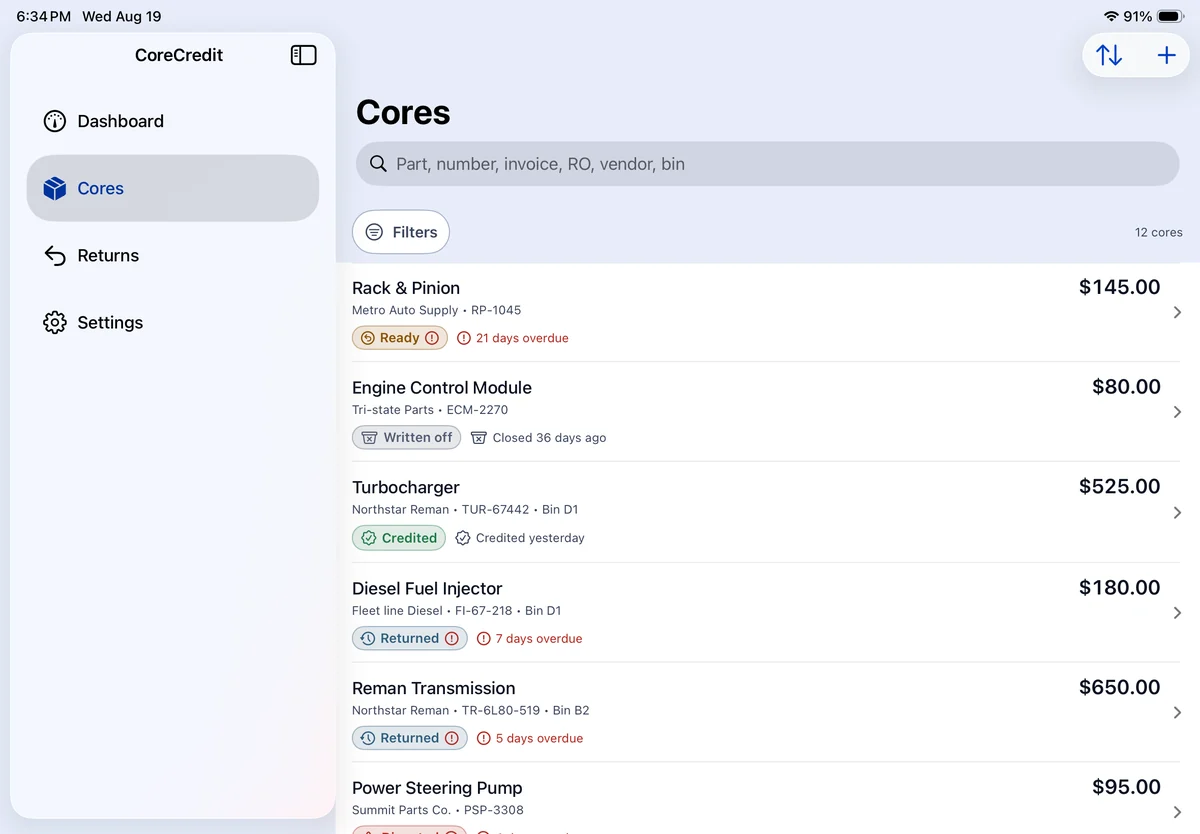
  2. Cores

    The whole ledger in one list — part, vendor, amount, status, and due date — searchable and filterable down to the one core you are arguing about.

  3. Scan core

    Barcode and printed-text capture in one sheet, with a review step before anything is saved and manual entry always available beside it.

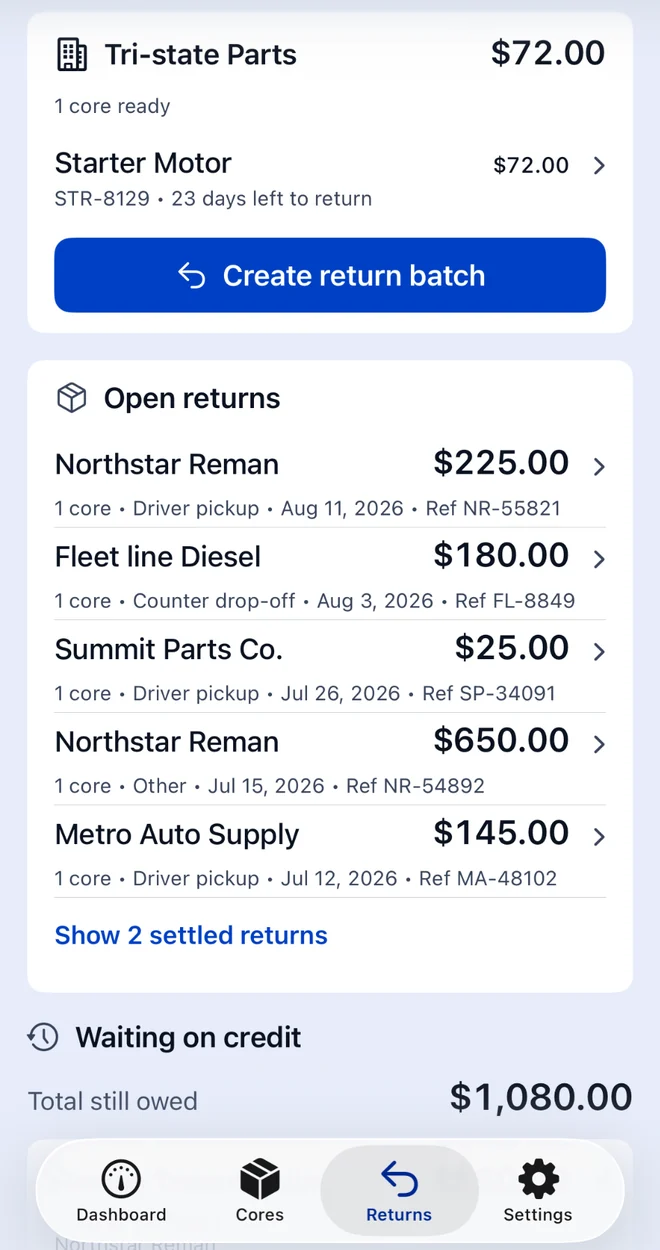
  4. Returns

    Everything going back to one vendor, grouped into a single batch with its own return reference, so a whole run can be reconciled together.

  5. Core detail

    One core's full history: amounts expected and received, the shortfall if there is one, evidence photos, and every event recorded against it.

  6. Dispute packet

    A short or missing credit assembled into one exportable document, so the conversation with the vendor starts from the record rather than from memory.

Screenshots of the finished app will be published here when CoreCredit reaches the App Store. Until then this page describes the app rather than illustrating it — there are no mock-ups on this site.

Local-first by design

Your shop's numbers stay on your shop's phone.

CoreCredit has no account, no sign-in, and no CoreCredit server behind it. There is nowhere for your ledger to go, because nothing was built to receive it.

  • Shop profile, vendors, bins, core records, events, and settings are stored on the device using Apple's on-device storage.
  • No analytics SDK, no advertising SDK, no crash-reporting SDK, and no tracking of any kind.
  • Barcode and text recognition run offline. Images and recognised text are never sent to Idlery.
  • Photos are attached only when you take or select them, through Apple's own picker.
  • The camera is requested only after you start a scan or a photo capture.
  • Exports leave the app only when you deliberately share or save them.
  • Reminders are local notifications, scheduled and delivered by your device.
  • Subscription purchases, when they arrive, are handled entirely by Apple.

Read the full privacy policy

CoreCredit is coming soon to iPhone.

It is finished enough to describe honestly and not finished enough to download. When it is on the App Store, this page will say so — and it will be the first place that does. There is no waitlist to join and no email to leave.

Coming soon for iPhone

Powered by Idlery